No code. No hassle. Just pure automation.

Invoices from your Fibery workspace, automaticallyFibery

Turn Invoice entities into branded PDF invoices with line items, client details and totals. Generate one when an invoice moves to Sent, and attach it to the entity.

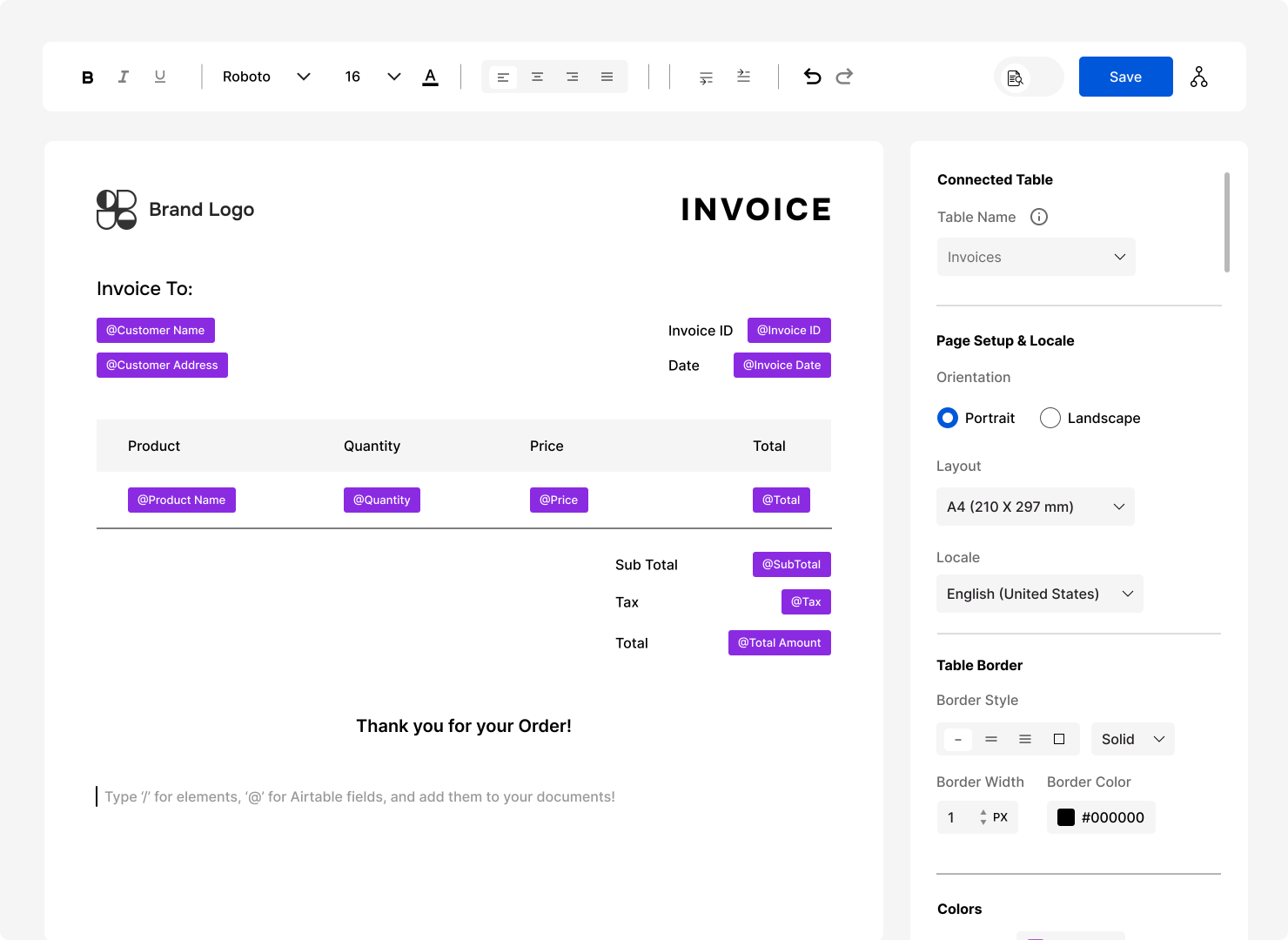
FlexiPage editor with a templated invoice document

How it Works

Set up invoice automation in minutes, powered by the invoices you already track in Fibery.

Connect Fibery

Sign up with FlexiPage and add your Fibery workspace URL and API key in settings.

Design the invoice

Pick your Invoice database. Add client details through the relation field and turn line items into a table.

Automate with a rule

Paste our script into a Fibery rule, for example when the state changes to Sent. The PDF lands in a Files field.

Why FlexiPage?

Invoicing with Fibery alone:

Fibery is great for tracking invoices, but producing the PDF is a separate job.

  • Templates are written by hand

    Fibery's Attach PDF action needs a Markdown or HTML template that you write and maintain.

  • Browser print loses the layout

    Printing an entity from the browser can crop text and tables.

  • Copying invoices by hand

    Pasting client details and line items into a document is slow and error-prone.

Why Choose FlexiPage?

FlexiPage turns Fibery invoice entities into finished PDFs.

  • Visual editor, no HTML

    Design the invoice with columns, tables and images in a visual editor.

  • Line items from relations

    A one-to-many relation becomes the line item table, with sorting and filters.

  • Runs on state changes

    A Fibery rule generates the invoice when its state changes, and attaches the PDF to the entity.

What You Can Do with Flexipage + Fibery

Everything an invoice needs, from your Fibery databases.

Fields across relations

Type '@' for invoice fields, and reach into related databases for the client's name and address.

Line item tables

Turn a one-to-many relation into line items with the Dynamic Table component, then sort and filter the rows.

Logos and images from files

Use a static logo, or pull one from a file field on the entity.

Conditional sections

Show a discount line, bank details or a late-payment note only when the invoice needs it.

Saved, emailed or both

Attach each invoice to a Files field, email it, or keep a permanent link in FlexiPage.

Multi-page invoices

Long invoices continue onto extra pages, and tables break cleanly between them.

Automate, Style & Format with Ease

Make every invoice look like yours, with your fonts, colours and local formats.

Auto-generate with FlexiPage API

Create invoices, contracts, and PDFs instantly with Fibery.

Brand-ready Styling

Design documents with your fonts, colors, and layouts easily.

Locale Formatting

Format dates, currency, and numbers for clients worldwide.

Simple pricing. Unlimited potential.

Start for free, upgrade as your automation grows.

Basic Plan

For small teams starting their automation journey.

$15/month

What’s included

  • 200 documents/month
  • Draft mode
  • Unlimited templates
  • All Editor features
  • Branded Emails
Get Started

Pro Plan

For growing teams running automation daily.

$45/month

What’s included

  • 1000 documents/month
  • Report builder & Charts
  • Pivot Table & Gantt Chart
  • Draft mode
  • Unlimited templates
  • All Editor features
Get Started

Business Plan

For organizations managing complex, high-volume workflows.

$95/month

What’s included

  • 5000 documents/month
  • Reports & Charts
  • Pivot Table & Gantt Chart
  • Draft mode
  • Unlimited templates
  • All Editor features
Get Started

Our Customer Testimonials

See how businesses across different industries use FlexiPage to streamline operations and save hours every week.

FlexiPage pulls necessary data from CRM and sends invoices

FlexiPage fits seamlessly into our day‑to‑day operations, especially when it comes to invoicing. By linking FlexiPage with our CRM, we’ve turned a previously manual, error‑prone process into an automated workflow that generates invoices in just a few clicks. The integration pulls the necessary data from our CRM bases, formats it according to our branding guidelines, and sends the finished invoices out automatically.

Neuli Refurbished

https://www.neuli.co.uk
InvoicesCredit Notes & Receipts

Simplifies a manual task that the team has been typing up

This tool is exactly what I needed to simplify a manual task that the team have been typing up. This process now means this process is self automated via the requirements built in the form & will save so much time for us in our team. Paz was great & helped me along the way to set this up by understanding what I needed to implement.

David Regis

Invitation Letters

FlexiPage is easy

Flexipage is easy. I love being able to design, create, and store my files without having to leave Airtable.

Sean Pritzkau

https://seanpritzkau.com
Invoices & Reports

Created a system for managing purchase orders, invoices, inventory, and more for our surgery center

FlexiPage has been instrumental in making my Airtable app function as needed for our company. I created a system for managing purchase orders, invoices, inventory, and more for our surgery center, and without the ability to create, customize, and generate the required PDF files and exports, the whole system wouldn't work. I'm thankful for the quick and extremely helpful support, updates, and affordable price of FlexiPage. I highly recommend it!

Danielle

InvoicesPurchase ordersInventory lists

Transform Airtable data into easy to read reports

FlexiPage integrates seamlessly into our workflow, transforming clunky Airtable data into clean, easy-to-read reports we use for tax projections and client profitability analysis.

Nick Cmerek

Client Profitability reportsTax Projections

Built a variety of multipage staff instructional documents for a large event

FlexiPage allowed my team to build out a variety of multipage staff instructional documents for a large event, saving us hours of time by pulling in the data we already had entered in our AirTable view. The FlexiPage team was readily available to answer questions via email or call and quick to fix bugs as well!

Melanie

Staff Instructional documents